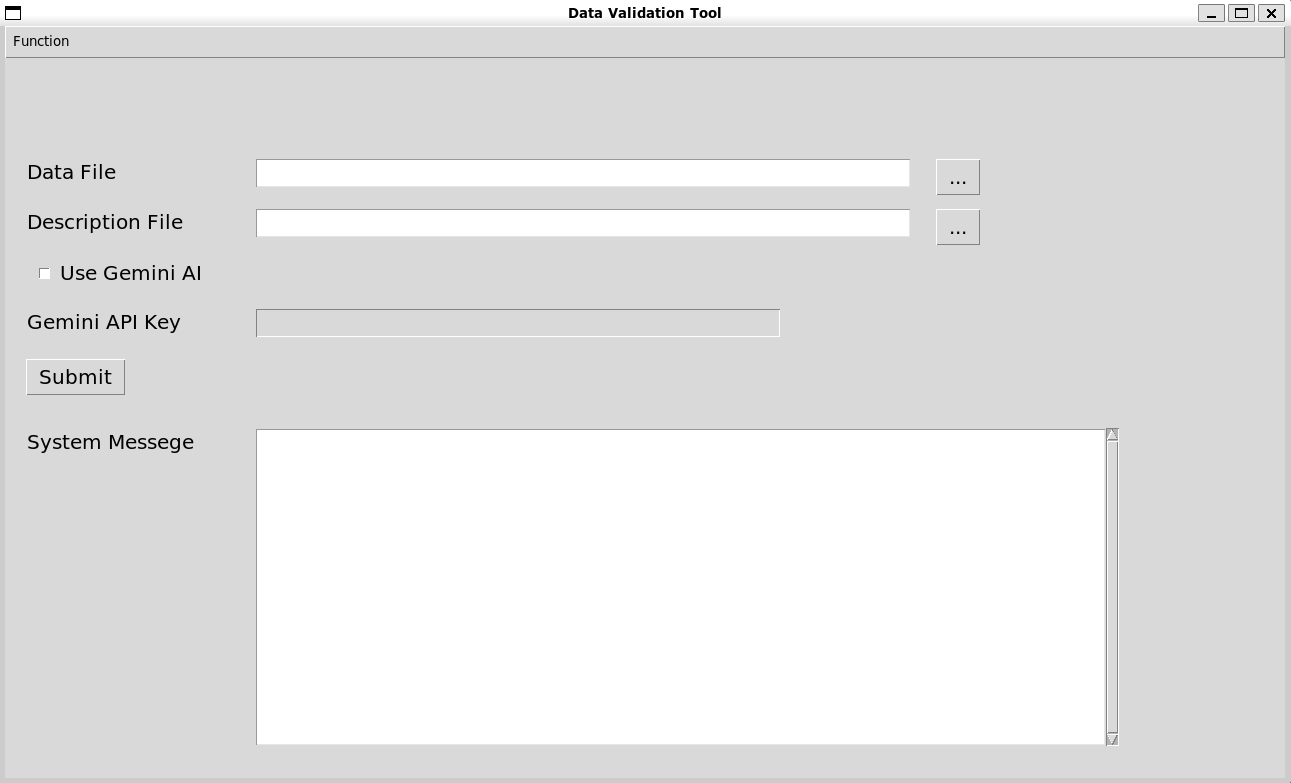
Generate Dataset Specification in YAML Format#
Use the Frictionless package#
Based on the dataset file (data.csv) uploaded by the user, use Schema.describe() function in the Frictionless package to generate the dataset specification (schema.yaml).
At the same time, based on the data field description file (description.csv) uploaded by the user, the title and description properties are filled in the dataset specification.
Note
Dataset file format restrictions:
The first row is the name of each field, and each of the remaining rows is a set of data.
Note
Data field description file format restrictions:
The first row is the name of each field, the second row is the title of each field, the third row is the description of each field, and the fourth row is the type of each field. Each data field must be exactly the same as the dataset file.
from frictionless import Schema

data_filename = 'data.csv'
yaml_filename = f'{data_filename}.schema.yaml' # The dataset specification is named 'dataset name + .schema.yaml'
schema = Schema.describe(data_filename)
schema.to_yaml(yaml_filename)
with open(description_filename, newline='') as csvfile:
    with open(yaml_filename, 'r', encoding='utf-8') as file:
        csv_reader = csv.reader(csvfile)
        listReport = list(csv_reader)
        yaml_data = yaml.safe_load(file)
        for i in range(len(yaml_data['fields'])):
            yaml_data['fields'][i]['title'] = listReport[1][i]
            yaml_data['fields'][i]['description'] = listReport[2][i]
    with open(yaml_filename, 'w', encoding='utf-8') as file:
        yaml.safe_dump(yaml_data, file)
Fill in the constraints property using Google Gemini model#
However, because the dataset specification generated by the Schema.describe() only contains two properties, name and type, the validate function cannot be effectively performed. Therefore, according to the data field description file uploaded by the user, a large language model is used to determine the constraints property of each field.
The large language model used here is gemini-1.5-flash in Google Gemini. Users can apply for a free API first and fill in the API Key in the Gemini API Key field. After processing the dataset file and data field description file, the program will automatically connect to the Gemini model. Due to property field restrictions and to avoid excessive accuracy gaps, currently only use the model to generate the reasonable minimum and maximum values of each data field. If the output result has a minimum or maximum value, the value will be filled in the dataset specification (schema.yaml); otherwise, if the model output is Null (meaning that the reasonable minimum or maximum value cannot be determined), filling in this field will be skipped.
The usage limit of the free version gemini-1.5-flash model API is: 15 requests per minute, 1500 requests per day. In order to avoid ResourceExhausted errors caused by using too many resources in an instant, there will be an interval between detecting and generating each field (currently set to 7 seconds).
If you do not want to use the Google Gemini model to generate the constraints property, just uncheck the Use Gemini AI checkbox. The program will only generate the dataset specification based on the dataset file and data field description file.
Text to query the Google Gemini model:
name: <name>\ntitle: <title>\ndescription: <description>\ntype: <type>\n\nThe above is the description of a data field. What is the maximum reasonable real-world value for this data field? Please output this value directly without any additional explanation. If the maximum reasonable real-world value cannot be determined, "Null" is output.
name: <name>\ntitle: <title>\ndescription: <description>\ntype: <type>\n\nThe above is the description of a data field. What is the minimum reasonable real-world value for this data field? Please output this value directly without any additional explanation. If the minimum reasonable real-world value cannot be determined, "Null" is output.
import google.generativeai as genai
def askGemini():
genai.configure(api_key = api_key)
model = genai.GenerativeModel('gemini-1.5-flash')
max_question = f'name: {name}\ntitle: {title}\ndescription: {description}\ntype: {type}\n\nThe above is the description of a data field. What is the maximum reasonable real-world value for this data field? Please output this value directly without any additional explanation. If the maximum reasonable real-world value cannot be determined, "Null" is output.'
max_response = model.generate_content(
contents=max_question,
safety_settings=safety_settings
)
min_question = f'name: {name}\ntitle: {title}\ndescription: {description}\ntype: {type}\n\nThe above is the description of a data field. What is the minimum reasonable real-world value for this data field? Please output this value directly without any additional explanation. If the minimum reasonable real-world value cannot be determined, "Null" is output.'
min_response = model.generate_content(
contents=min_question,
safety_settings=safety_settings
)
return max_response.text.strip(), min_response.text.strip()
When using the Google Gemini model to fill in the constraints property, the System Message field in the application interface will display system information. You may expect to see the following information:
Create <yaml_filename> sucessfully: Successfully used theSchema.describe()function to generate the dataset specification.Detecting <name> field...: The model is being used to generate the reasonable minimum and maximum values of the<name>field.<name> field:\nminimum:<min>, maximum:<max>: The detection of the<name>field has been completed. The reasonable minimum value generated by the model is<min>, and the reasonable maximum value is<max>.ResourceExhausted error occurred, will automatically retry: The API resource usage limit has been exceeded, and it will automatically retry after an additional waiting period.Multiple ResourceExhausted errors occurred, terminating AI detection: If the API resource usage limit is still exceeded after multiple attempts, model generation will be automatically interrupted.InvalidArgument error occurred, please check API key: The API Key provided by the user may be incorrect.Unexpected error occurred: An unexpected error occurred during the Google Gemini model generation process.AI detection completed: The Gemini model generation of the dataset specification has been completed.